How to Start a Photography Blog in 6 Simple Steps
Starting a photography blog is one of the best ways to share your work, connect with potential clients, and create an online space that reflects your style and creativity.
Whether you’re a family photographer, wedding photographer, or hobbyist, a blog can help grow your audience while improving your website’s visibility on search engines.
If you’ve been wondering how to start a photography blog, these six simple steps will help you build a strong foundation.

Why Every Photographer Should Have a Blog
A photography blog does more than showcase pretty images. It helps:
- Improve your website SEO
- Attract new clients through Google searches
- Build trust with your audience
- Share helpful tips and experiences
- Keep your website active and updated
The more valuable content you create, the easier it becomes for potential clients to find you online.
Step 1: Choose Your Photography Blog Niche
Before creating content, decide what your photography blog will focus on. Choosing a niche helps you attract the right audience and makes content planning easier.
Some photography blog ideas include:
- Family photography
- Newborn photography
- Wedding photography
- Photography tips & tutorials
- Editing workflows
- Photography business advice
- Camera gear reviews
- Lifestyle & behind-the-scenes content
Try to choose topics that naturally fit your photography business and personal style. If you are unsure which niche to focus on, start by thinking about which types of shoots you enjoy most, the kinds of client sessions that inspire you, or the photography questions you are asked most often.
Reflecting on your favorite projects and considering your ideal clients’ needs or interests can help you pick a niche that feels both authentic and sustainable.
SEO Tip: Use keywords your audience is already searching for, such as:
- “Photography tips for beginners”
- “How to prepare for a family photo session”
- “Best camera settings for outdoor portraits”
Step 2: Pick a Blogging Platform & Domain Name
To start your photography blog, you’ll need:
- A domain name
- Website hosting
- A blogging platform
Many photographers choose platforms like WordPress because they are flexible, beginner-friendly, and SEO-friendly.
Other popular options include Squarespace and Wix, which also make it easy to build a professional-looking photography blog.
If you are just getting started, here is a quick overview of the setup process:
- Register your domain name: Use a domain registrar such as BigScoots or GoDaddy to search for and purchase your chosen domain name.
- Choose a website hosting provider: Some platforms like Squarespace and Wix include hosting, but if you choose WordPress, you will need a separate host (like Bluehost or SiteGround).
- Connect your domain to your blogging platform: Follow the instructions from your hosting provider or website platform to link your domain with your site. Most platforms offer step-by-step guides or customer support if you need help with this step.
Taking these three steps will help you turn your blog idea into a live website quickly and with less stress for beginners.
When choosing your domain name:
- Keep it simple and memorable
- Avoid numbers or hard-to-spell words
- Try to match your photography business name
Example:
- yournamephotography.com
- timelessportraits.com
Pro Tip: Choose a clean website design that highlights your photography without clutter. Simple layouts, large image banners, and minimal color palettes help your photos stand out and make your site easy for visitors to navigate.

Step 3: Create SEO-Optimized Blog Content
The key to growing a successful photography blog is creating content that people actively search for.
Focus on helpful, searchable blog topics like:
- What to wear for family photos
- Best locations for engagement sessions
- Photography tips for beginners
- How to pose naturally in photos
Basic Photography Blog SEO Tips
- Use your main keyword in the title (H1)
- Add keywords naturally throughout the post
- Write clear headings (H2 & H3)
- Add alt text to images
- Link to related blog posts on your website
- Keep paragraphs short and easy to read
Example SEO Blog Titles
- How to Prepare for Your Newborn Photography Session
- 10 Tips for Natural Family Photos
- Beginner Photography Tips for Better Indoor Photos
Step 4: Use High-Quality Images
Since photography is visual, your blog should showcase your best work.
When adding images:
- Use sharp, high-quality photos
- Compress images so pages load faster
- Add descriptive file names
- Include keyword-rich alt text
Example: Instead of: IMG_4587.jpg
Use: outdoor-family-session-pennsylvania.jpg
Fast-loading websites improve both user experience and SEO rankings.
Step 5: Stay Consistent & Promote Your Blog
Consistency matters more than perfection. You don’t need to publish every day — even posting 1–2 times per month can help your photography website grow over time.
Ways to promote your photography blog:
- Share posts on Pinterest
- Post previews on Instagram & Facebook
- Send blog updates to your email list
- Link blog posts in client guides
- Use SEO-friendly Pinterest pin titles
The more consistently you publish helpful content, the more opportunities you create for people to discover your photography business.
To maintain momentum and avoid burnout, consider simple consistency strategies. Set a regular posting schedule based on what you can realistically commit to each month.
Tools like digital content calendars (such as Google Calendar or Trello) help you plan upcoming blog topics in advance and keep track of deadlines.
You can also try batching content by writing and preparing several posts at once, so you have posts ready to go even during busy weeks.
These habits can help you build a steady blogging routine and ensure your photography blog continues to grow over time.
Step 6: Back Up Your Blog Posts & Images
One of the most overlooked parts of running a photography blog is creating regular backups for your website content and images. Your blog posts, client galleries, and photography files are valuable, so protecting them is essential.
Website issues, accidental deletions, or technical problems can happen unexpectedly. Having backups in place helps ensure your hard work isn’t lost.
Consider backing up:
- Blog posts
- Website files
- Edited images
- Branding graphics
- Client resources
- Website databases
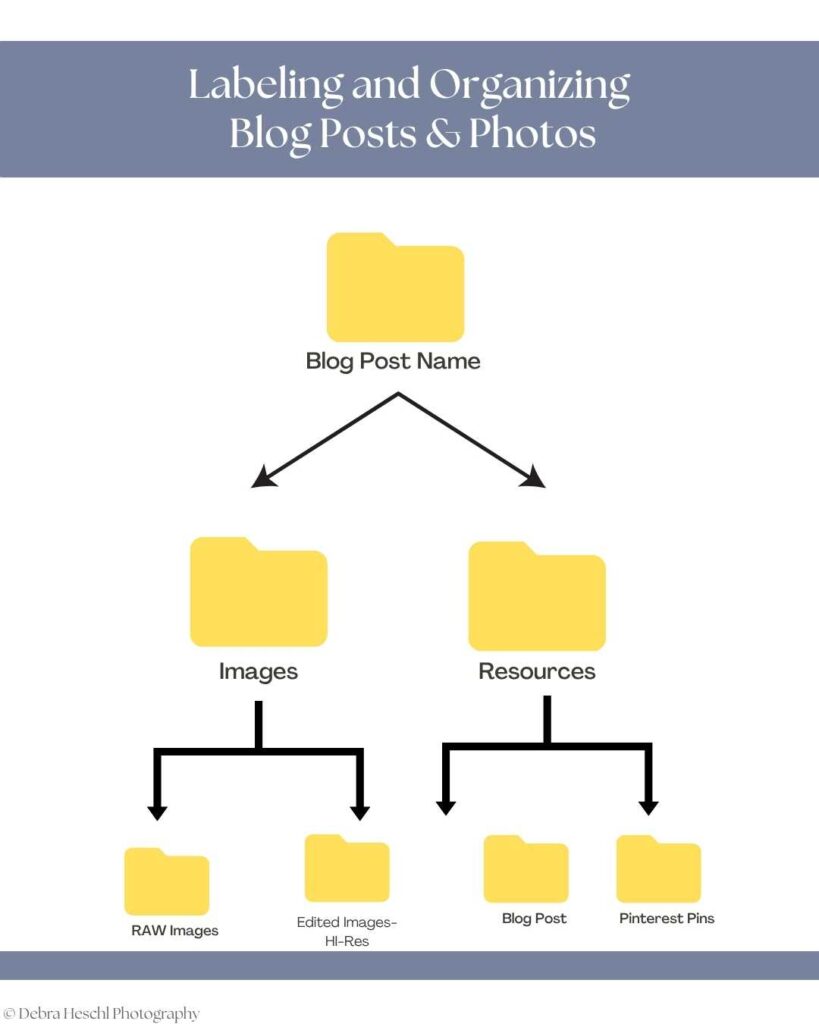
Many photographers use cloud storage, external hard drives, or website backup plugins to keep their content safe and organized.
Popular options include cloud services like Backblaze and Dropbox, as well as website backup plugins such as UpdraftPlus and BackupBuddy.
These tools can make it easier to schedule automatic backups and quickly restore your site if something goes wrong.
Pro Tip: Create a regular backup routine so your photography blog content and images stay protected as your website grows.
Common Photography Blogging Mistakes to Avoid
Starting a photography blog can feel overwhelming at first, and many beginners make similar mistakes along the way. Avoiding these common blogging mistakes can improve your website’s SEO, grow your audience, and create a better reader experience.
Not Blogging Consistently
Consistency matters more than perfection when growing a photography blog. Publishing helpful content regularly helps improve SEO and gives potential clients more opportunities to discover your website.
Ignoring SEO
Without SEO, it becomes much harder for people to find your blog through Google searches. Using keywords naturally, optimizing images, and writing clear headings can make a big difference over time.
Uploading Large Image Files
Large image files can slow down your website, which affects both user experience and SEO rankings. Compressing images before uploading helps your pages load faster while still maintaining quality.
Writing Only for Other Photographers
While photography education can be valuable, many photographers also forget to create content for potential clients. Blog posts that answer client questions often perform better and help build trust.
Forgetting Calls-to-Action
Every blog post should guide readers toward the next step. Whether it is exploring another post, joining your email list, or booking a session, clear calls to action (CTA) help increase engagement.
Here are some CTA examples tailored for photography blogs:
- Book a session with me
- Download my free posing guide
- Sign up for photography tips via email
- View my portfolio
- Leave a comment with your questions
- Share this post with friends
Including a specific CTA at the end of each post makes it easier for visitors to know what to do next and helps you achieve your blogging goals.
Photography Blog Checklist Before Publishing
Before hitting publish on your photography blog post, take a few minutes to review everything carefully.
A simple checklist can help improve your SEO, enhance the reader experience, and ensure your content is fully optimized before sharing it online.
Before Publishing a Blog Post:
- Add your main SEO keyword naturally throughout the post
- Rename image files with descriptive keywords
- Add alt text to all images
- Include a Pinterest graphic for sharing
- Add internal links to related blog posts
- Proofread for spelling and grammar errors
- Make sure images are properly compressed
- Add a clear call-to-action
- Check mobile readability and formatting
- Share your post on social media and Pinterest
Growing a Photography Blog Takes Time
Growing a photography blog takes time, patience, and consistency. Unlike social media posts that may gain attention quickly, blog content often grows gradually through SEO and search engines like Google and Pinterest.
Some posts may take weeks or even months to gain traction, which is completely normal.
The key is to stay consistent and continue creating helpful, valuable content for your audience. Every blog post becomes another opportunity for potential clients to discover your photography business online.
Over time, consistent blogging can help increase website traffic, improve SEO rankings, and build trust with future clients.
Recommended Posts You’ll Fancy!

Frequently Asked Questions
Final Thoughts
Starting a photography blog may feel overwhelming at first, but it becomes much easier when you take it one step at a time.
In addition to sharing helpful, authentic content that serves your audience while showcasing your photography style, try weaving in your own stories and behind-the-scenes insights.
Sharing what inspired a particular photo session, funny moments on set, or your creative process helps your blog stand out and lets readers connect with you on a personal level.
Over time, your blog can become one of the most valuable tools for growing your photography business, improving SEO, and connecting with future clients.
Pin for Later!